Apple Mail 2

To set up your Apple Mail client to work with Gmail:

  1. Enable IMAP in Gmail.
  2. Open Apple Mail.
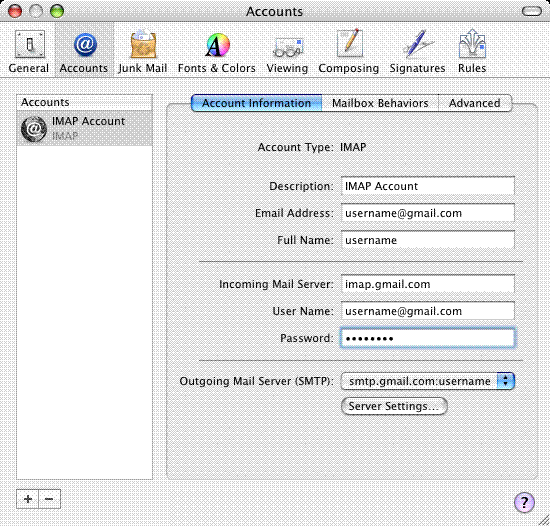
  3. Click 'Mail,' and select 'Preferences...'
  4. Open the 'Accounts' tab, and click the plus sign (+) along the bottom to add a new account.
  5. Select 'IMAP' in the 'Account Type' drop-down menu.
  6. Enter your name and Gmail address in the appropriate fields, then click 'Continue.' Google Apps users: Enter your full email address in the format 'username@your_domain.com.' 


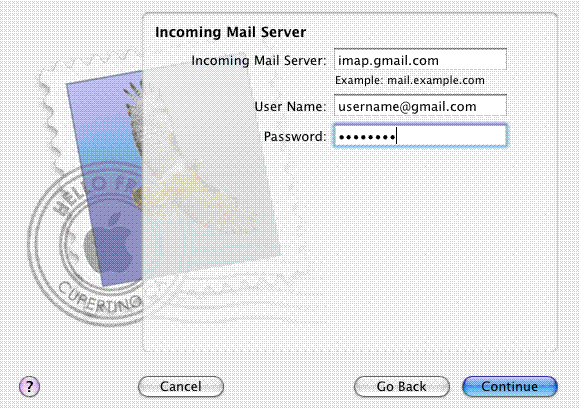
  7. Enter 'imap.gmail.com' next to 'Incoming Mail Server'; enter your full Gmail address next to 'User Name'; enter your Gmail password; then click 'Continue.' Google Apps users: Enter the server name provided, don't add your domain name in this step. 


  8. For Outgoing Mail Server, enter 'smtp.gmail.com'; select 'Use Authentication'; enter your full Gmail address next to 'User Name'; and enter your password. Then click 'Continue.' Google Apps users: Enter the server name provided, but enter your full email address at your domain as the User Name. 


  9. If setup is successful, you'll see the screen below. Then just click 'Done.' 


  10. Click the 'Server Settings...' button. 


  11. Verify that 'Outgoing Mail Server' is smtp.gmail.com:username@gmail.com.
  12. Verify that 'Server port' is 587.
  13. Verify that 'Use Secure Sockets Layer (SSL)' is checked.
  14. Enter your full Gmail or Google Apps email address next to 'User Name,' enter your password, and click 'OK.' 


  15. Click 'Advanced' and check the box next to 'Use SSL.' (The port changes to '993.') 

  • 0 Users Found This Useful
Was this answer helpful?

Related Articles

Outlook Express (Windows)

To set up your Outlook Express client to work with Gmail: Enable IMAP in Gmail. Don't forget...

Outlook 2003

To set up your Outlook 2003 client to work with Gmail: Enable IMAP in Gmail. Don't forget to...

Outlook 2007 (Windows)

To set up your Outlook 2007 client to work with Gmail: Open Outlook. For new setups,...

Apple Mail 3 (Leopard)

Please note that if you're adding your Gmail address to Apple Mail 3.0 for the first time, your...

Windows Mail

To set up your Windows Mail client to work with Gmail, just follow these steps: Open Windows...

Powered by WHMCompleteSolution